



Why Most Anti-Detect Browsers Fail at Real Android Simulation — And How TrafficBotPro Gets WebGPU Right
In the world of multi-accounting, automation, and privacy-focused browsing, “Android simulation” has become a standard selling point for fingerprint browsers. Most tools claim they can perfectly mimic a mobile device. They change the User-Agent, adjust the screen resolution, spoof WebGL, and even mask the Canvas fingerprint. On the surface, everything looks good.
But surface-level spoofing is no longer enough.
Modern fingerprinting platforms have moved far beyond WebGL. One of the strongest and most revealing signals today is WebGPU — and this is where the majority of popular fingerprint browsers completely fall apart.
The WebGPU Reality Check
WebGPU is a modern graphics API that exposes low-level hardware information about the GPU. Unlike the older WebGL, which many tools have learned to spoof reasonably well, WebGPU reveals the actual vendor and architecture of the graphics adapter.
When a browser claims to be an Android device, the WebGPU report should consistently show mobile GPU characteristics — typically ARM-based vendors and architectures such as Valhall (common in modern Mali GPUs).
Let’s look at what actually happens in practice.
What Real Consistency Looks Like (TrafficBotPro)
When TrafficBotPro is configured to simulate an Android browser, the WebGPU Adapter Info returns:
- Vendor: arm
- Architecture: valhall
This matches what you would expect from a genuine high-performance mobile GPU. The fingerprint is coherent across layers.
What Most “Android Mode” Browsers Actually Show
Many well-known fingerprint browsers do a decent job on the classic WebGL check. You will often see something like:
- Unmasked Vendor: ARM
- Unmasked Renderer: Mali-T880
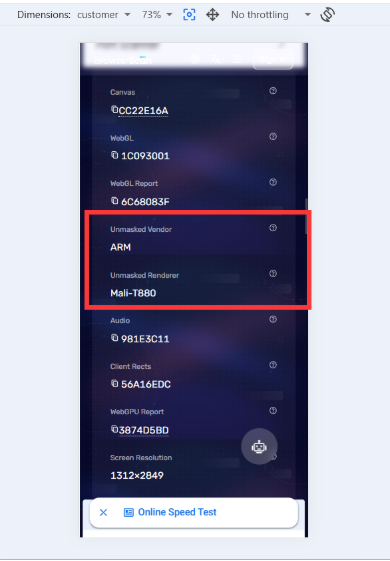
At first glance, this looks like a real Android device. Many users stop checking here and assume the spoof is solid.
However, the moment you open the deeper WebGPU report (for example on BrowserScan’s WebGPU page), the illusion collapses:
- Vendor: intel
- Architecture: gen-9
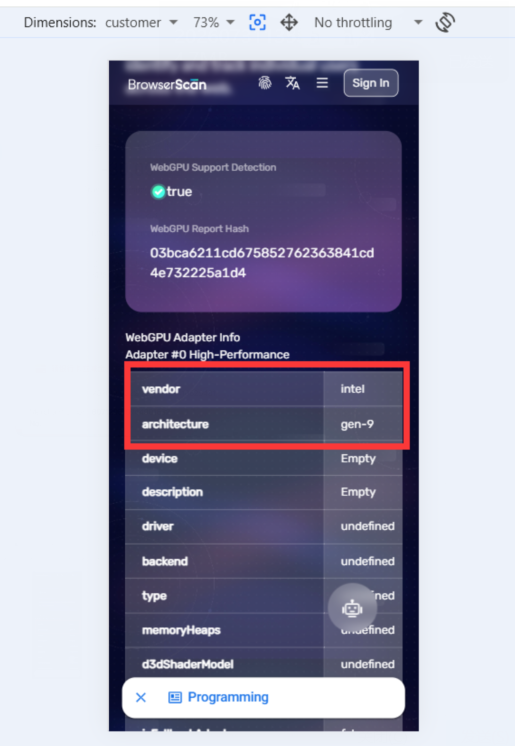
This is classic desktop Intel integrated graphics — completely inconsistent with the claimed ARM / Mali identity. The browser is essentially wearing a mobile mask while the real hardware is still visible underneath.
This kind of mismatch is extremely easy for advanced detection systems to catch. Once WebGPU, WebGL, and other low-level signals contradict each other, the profile is flagged as synthetic.
Why This Matters More Than Ever
Fingerprint detection has become multi-layered. Platforms no longer rely on a single signal. They cross-check:
- WebGL vendor/renderer
- WebGPU adapter information
- Canvas and Audio fingerprints
- Hardware concurrency, device memory, and client rects
- Behavioral and timing signals
A browser that only spoofs the “easy” layers while leaking the true GPU architecture through WebGPU creates a high-risk profile. In competitive environments (ad platforms, social networks, e-commerce, etc.), this inconsistency can lead to faster bans, shadowbans, or permanent account restrictions.
True Android simulation requires deep consistency — every graphics-related API must tell the same story.
TrafficBotPro’s Approach
TrafficBotPro was built with the understanding that modern anti-detect work demands more than cosmetic changes. When you select an Android profile, the entire graphics stack is aligned:
- WebGL reports mobile vendor and renderer
- WebGPU reports matching ARM / Valhall (or equivalent mobile architecture)
- Other low-level signals remain coherent with a real mobile environment
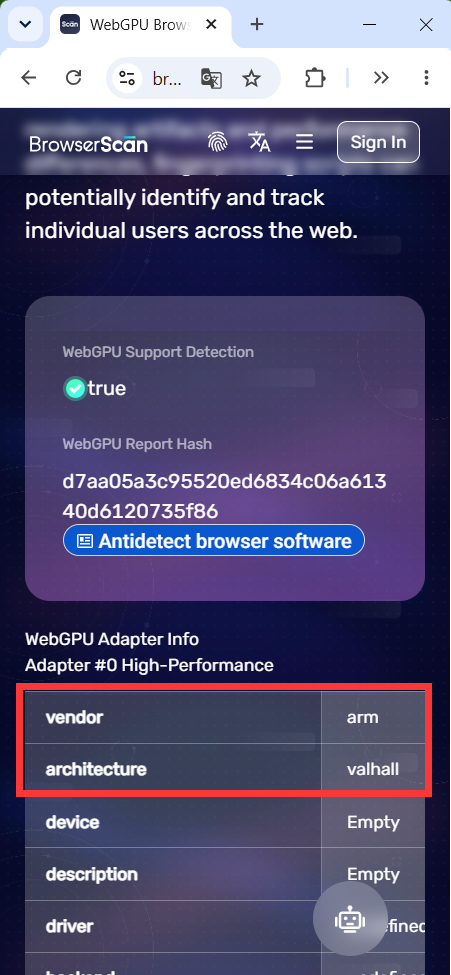
The result is a fingerprint that does not fall apart the moment a site digs past the first layer of checks.
Conclusion
Spoofing WebGL is table stakes in 2025–2026. The real differentiator is whether a tool can maintain consistency all the way down to WebGPU and other emerging APIs.
Most fingerprint browsers still treat Android simulation as a surface-level disguise. TrafficBotPro treats it as a full-stack hardware identity.
If your use case requires reliable, long-term Android browser profiles, the difference between “looks like mobile on BrowserScan’s main page” and “actually consistent across WebGPU” is not cosmetic — it is the difference between profiles that survive and profiles that get burned.