



What Is Chrome PlatformVersion? The Hidden Fingerprint That Reveals Windows 10 vs Windows 11
For years, browser fingerprinting has evolved far beyond simple User-Agent strings. Modern websites, advertising platforms, anti-fraud systems, and analytics tools now rely on dozens of browser attributes to identify devices and evaluate traffic quality.
One of the most overlooked fingerprint parameters is PlatformVersion.
Many users have heard of browser fingerprints such as Canvas, WebGL, Screen Resolution, and Hardware Concurrency. However, very few understand what PlatformVersion is, why it exists, and how websites use it to distinguish between Windows 10 and Windows 11 systems.
In this article, we'll break down how PlatformVersion works, why it matters for realistic browser simulation, and why TrafficBotPro gives users a level of control that most fingerprint browsers simply don't offer.
What Is PlatformVersion?
PlatformVersion is part of the modern User-Agent Client Hints (UA-CH) system introduced by Google Chrome.
Traditional User-Agent strings are gradually being reduced in detail to improve privacy and reduce passive fingerprinting. To compensate, Chrome introduced User-Agent Client Hints, which provide system information through JavaScript APIs and HTTP request headers.
One of those values is:
navigator.userAgentData.getHighEntropyValues(["platformVersion"]);
The returned result may look similar to:
{ "platform": "Windows", "platformVersion": "15.0.0" }or
{ "platform": "Windows", "platformVersion": "20.0.0" }
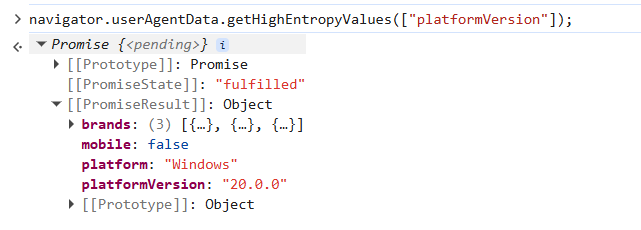
Unlike the traditional User-Agent string, websites can use PlatformVersion to obtain more accurate operating system information.
How Chrome Identifies Windows 10 and Windows 11
This is where things become interesting.
Historically, both Windows 10 and Windows 11 report:
Windows NT 10.0inside the User-Agent string.
As a result, websites could not reliably determine whether a visitor was using Windows 10 or Windows 11.
Google solved this problem through PlatformVersion.
Chrome internally maps Windows versions to PlatformVersion values.
A simplified example:
| PlatformVersion | Typical Interpretation |
|---|---|
| 10.0.0 | Older Windows builds |
| 13.0.0 | Windows 10 |
| 14.0.0 | Windows 10 |
| 15.0.0 | Windows 11 |
| 18.0.0 | Newer Windows 11 builds |
| 19.0.0 | Newer Windows 11 builds |
| 20.0.0 | Latest Windows 11 generations |
In practice, websites often use a simple rule:
if(platformVersion >= 13) {    // Windows 11 }
else {    // Windows 10 }
The exact implementation varies between websites, but the concept remains the same.
This means PlatformVersion has become one of the primary signals used to distinguish Windows 10 from Windows 11 users.
Why PlatformVersion Matters for Browser Fingerprints
Many anti-bot systems don't look at a single fingerprint parameter.
Instead, they analyze consistency.
For example:
| Fingerprint Component | Value |
| User-Agent | Windows NT 10.0 |
| PlatformVersion | 20.0.0 |
| GPU | RTX 4060 |
| Screen Resolution | 2560×1440 |
| Chrome Version | 149 |
| Device Memory | 16 GB |
These values collectively create a believable device profile.
Problems occur when one component doesn't match the others.
For example:
| Fingerprint Component | Value |
| User-Agent | Windows 10 |
| PlatformVersion | 20.0.0 |
| GPU | 2017-era hardware |
| Chrome Version | Extremely old |
Such inconsistencies may trigger risk scoring systems.
Modern traffic analysis platforms frequently evaluate fingerprint coherence rather than focusing on a single identifier.
This is why advanced browser fingerprint control is becoming increasingly important.
The Problem with Most Fingerprint Browsers
Surprisingly, many fingerprint browsers still treat PlatformVersion as an afterthought.
Common limitations include:
1. PlatformVersion Is Hardcoded
Some browsers always return:
15.0.0for every Windows profile.
No matter what operating system you configure, the value never changes.
This creates thousands of browser profiles sharing the exact same fingerprint characteristic.
2. PlatformVersion Cannot Be Modified
Many fingerprint browsers expose controls for:
- User-Agent
- Screen Resolution
- Timezone
- Language
- WebGL
- Canvas
But they completely ignore PlatformVersion.
Users simply have no option to adjust it.
3. Fake Windows Diversity
A browser may claim to generate unique Windows fingerprints.
However, when inspected through JavaScript:
navigator.userAgentData.platformVersionevery profile reports the same value.
This significantly reduces operating system diversity.
How TrafficBotPro Handles PlatformVersion
TrafficBotPro approaches browser fingerprint simulation differently.
Instead of forcing a single fixed PlatformVersion, TrafficBotPro allows users to generate and randomize multiple realistic Windows PlatformVersion values.
Supported examples include:
10.0.0 15.0.0 18.0.0 19.0.0 20.0.0This enables the creation of device populations that more closely resemble real-world traffic distributions.
For example:
| Device | PlatformVersion |
| Device A | 10.0.0 |
| Device B | 15.0.0 |
| Device C | 18.0.0 |
| Device D | 19.0.0 |
| Device E | 20.0.0 |
Instead of every browser appearing to come from the exact same Windows generation, TrafficBotPro can introduce realistic variation across sessions and devices.
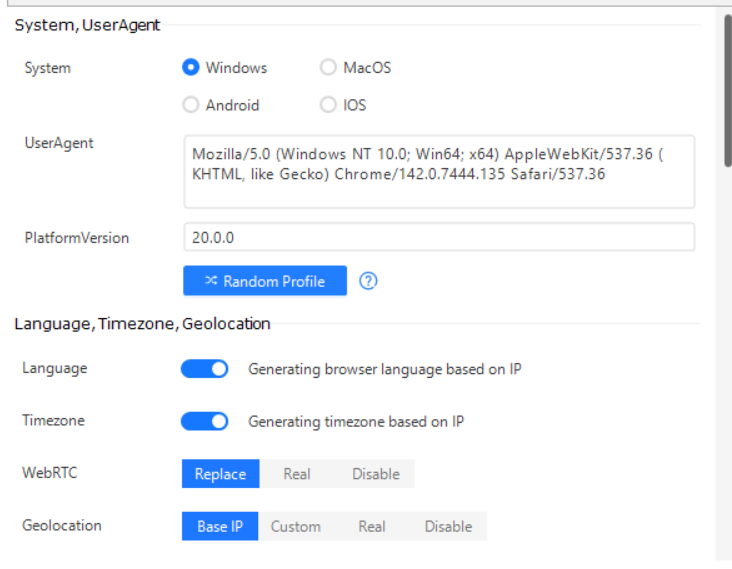
This capability is rarely found in conventional fingerprint browsers.
In many competing products, PlatformVersion is either fixed internally or not configurable at all.
Why Advanced Users Care About PlatformVersion
For casual browsing, PlatformVersion may not matter.
For professionals working with:
- Browser automation
- QA testing
- Fingerprint research
- Traffic simulation
- Ad verification
- Behavioral testing
it can become an important parameter.
As anti-fraud systems continue to evolve, seemingly minor fingerprint fields often become valuable detection signals.
Ignoring them can create unrealistic browser environments.
Managing them properly helps create more accurate device profiles.
Final Thoughts
PlatformVersion is one of the newer browser fingerprint attributes introduced through Chrome's User-Agent Client Hints framework.
While most internet users never notice it, websites increasingly use it to distinguish Windows versions and evaluate browser authenticity.
Unfortunately, many fingerprint browsers either hardcode PlatformVersion or don't provide any control over it at all.
TrafficBotPro takes a different approach by allowing realistic PlatformVersion generation and randomization, including values such as:
- 10.0.0
- 15.0.0
- 18.0.0
- 19.0.0
- 20.0.0
Combined with other fingerprint controls, this helps build more diverse and realistic browser profiles for testing, research, and automation environments.
As browser fingerprinting technology continues to advance, details that once seemed insignificant are becoming increasingly important. PlatformVersion is one of those details.