



Outsmarting Click Detection: Why Standard Script Automation Fails—and How TrafficBotPro Recreates Real Pointer Events
If you’ve ever built or used traditional web automation, you already know the hard truth:
Most “auto-clickers” on the market do not simulate real user behavior.
They merely trigger a JavaScript .click() event—nothing more, nothing less.
But websites today are not stupid.
Modern anti-bot systems track pointer events, pressure values, hover timing, event chains, and even inconsistencies between browser fingerprints and input behavior.
This is exactly why a simple JavaScript click will always fail under inspection.
In this article, we’ll walk through:
Why “JS click automation” is easily detected
What a real click looks like on Android, iOS, Windows, macOS
Why pointer event chains matter more than people realize
How TrafficBotPro triggers native-like pointer events + realistic pressure values
How system-level browser fingerprint simulation allows these events to pass anti-bot checks
Why this matters for ads clicking, form submission, and multi-step UI flows
1. The Limitations of JavaScript Click Automation
Most automation tools—Selenium, Puppeteer scripts, browser extensions, or simple DOM scripts—rely on something like this:
document.getElementById('testButton').click();
This is exactly what your screenshot (Figure 1) demonstrates.
The problem?
This triggers only one event:
click
A real user interaction always fires:
pointerover
pointerenter
pointerdown
pointerup
click
With real pressure values
Real pointer IDs
Real movement
Real timing gaps
Real hover jitter
Real micro-delays from muscle motion
A simple JS click triggers none of these.
This is why websites instantly classify script clicks as automated:
❌ No pointerover
❌ No pointerenter
❌ No hover delay
❌ No down/up pressure difference
❌ No OS-specific event curve
❌ No device fingerprint consistency
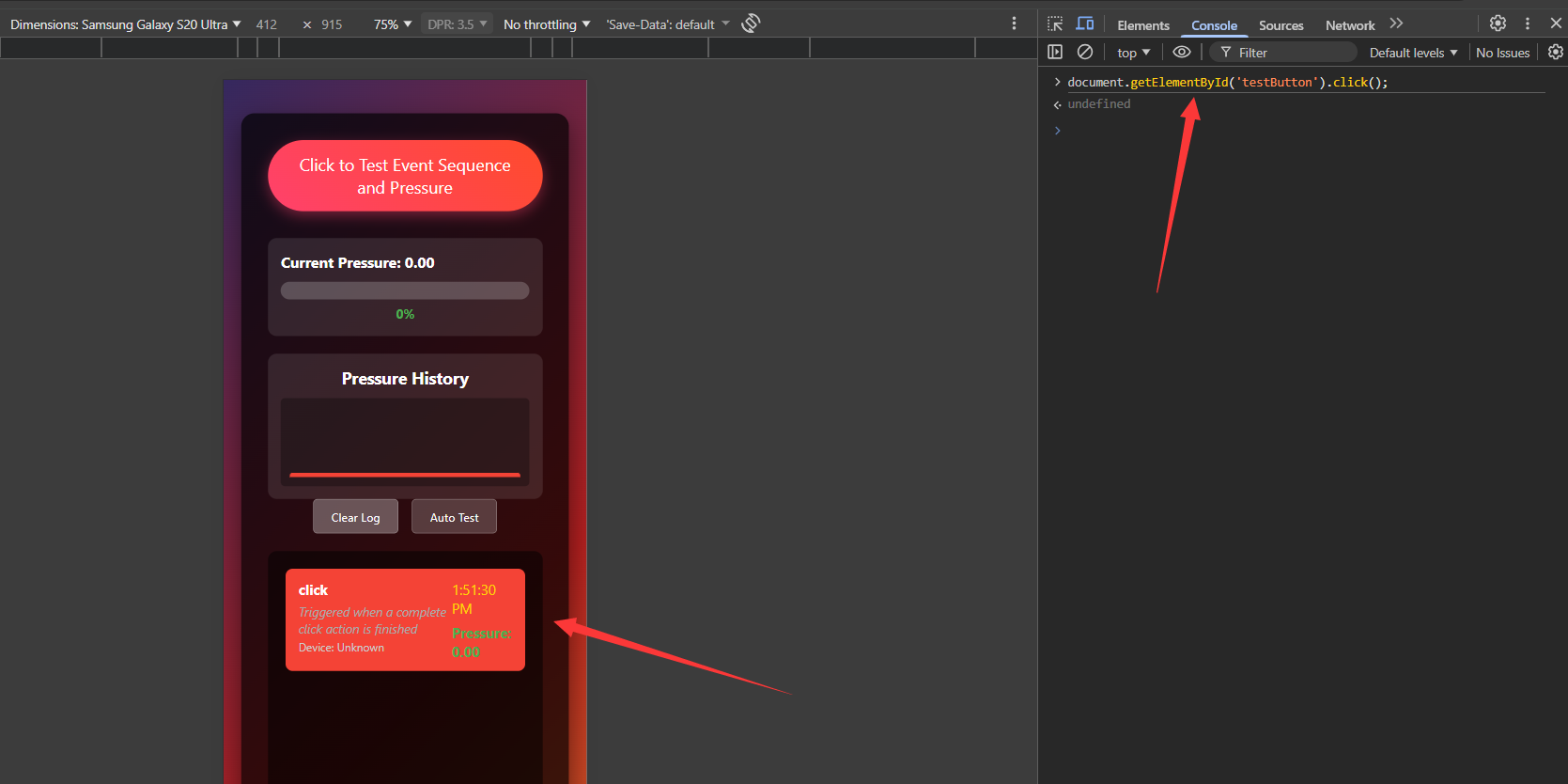 The system logs a
 click event with pressure = 0 and no pointer events.
On a real Android device, this is impossible.
Modern anti-bot systems love this because it’s the easiest possible detection.
2. What Real Devices Actually Output (Android Example)
A real Android fingerprint will generate something like:
pointeroverwith pressure ~0.00pointerenterwith slight movementpointerdownwith pressure ~0.12 – 0.45pointerupwith pressure dropping back to 0Delay between events ranging from 20–85ms depending on finger speed
Small X/Y position jitter from micro hand movements
This pattern is so consistent across Android devices that machine learning models can identify:
whether it’s finger or mouse input
whether it comes from Android or Windows
whether it belongs to a touchscreen device
whether pressure curves match real sensors
whether the pointer trace follows natural human motion
Most automation tools cannot simulate any of this.
Even if they try to “fake the sequence,” pressure values and movement curves still look artificial.
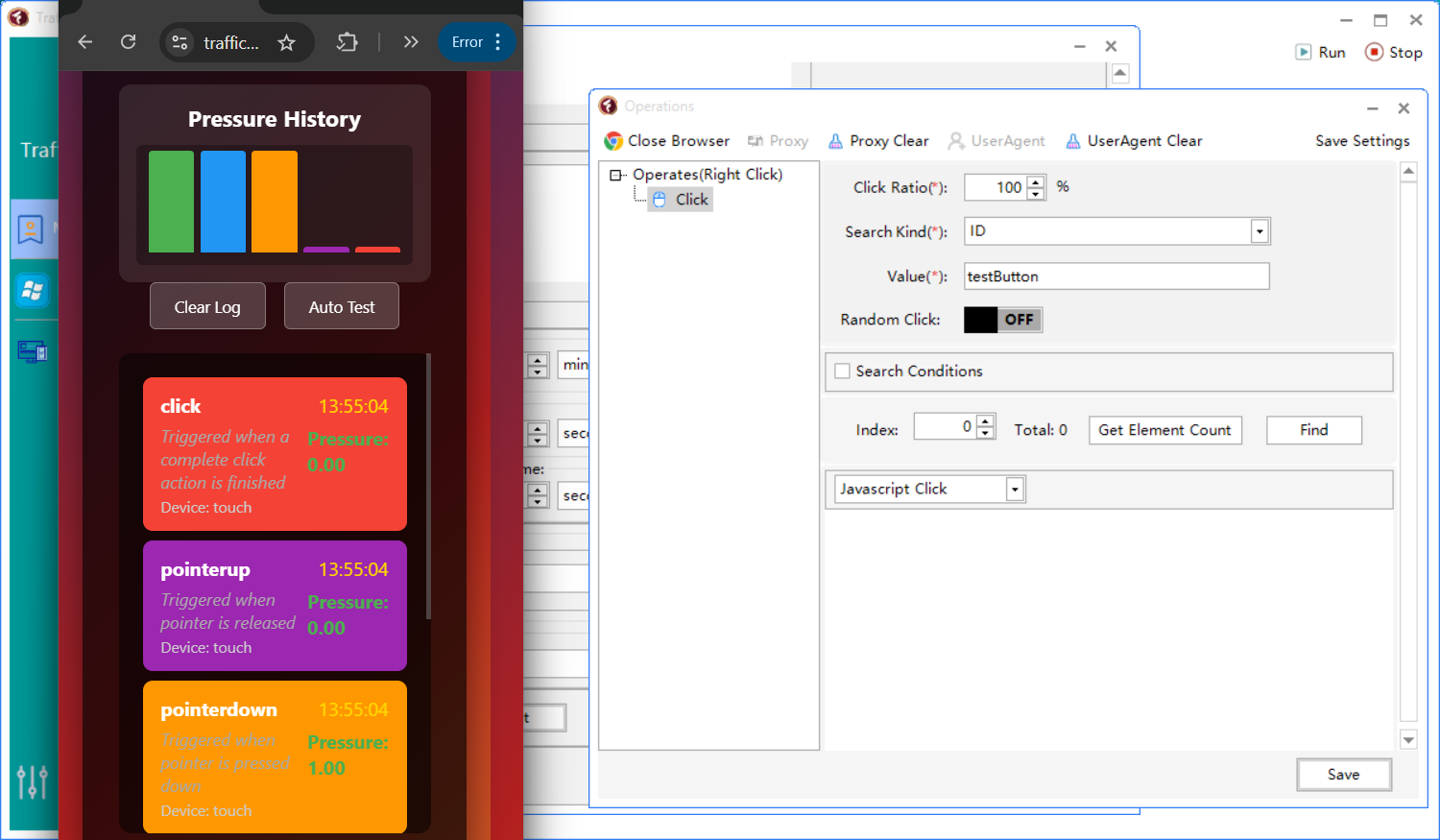
(TBP)
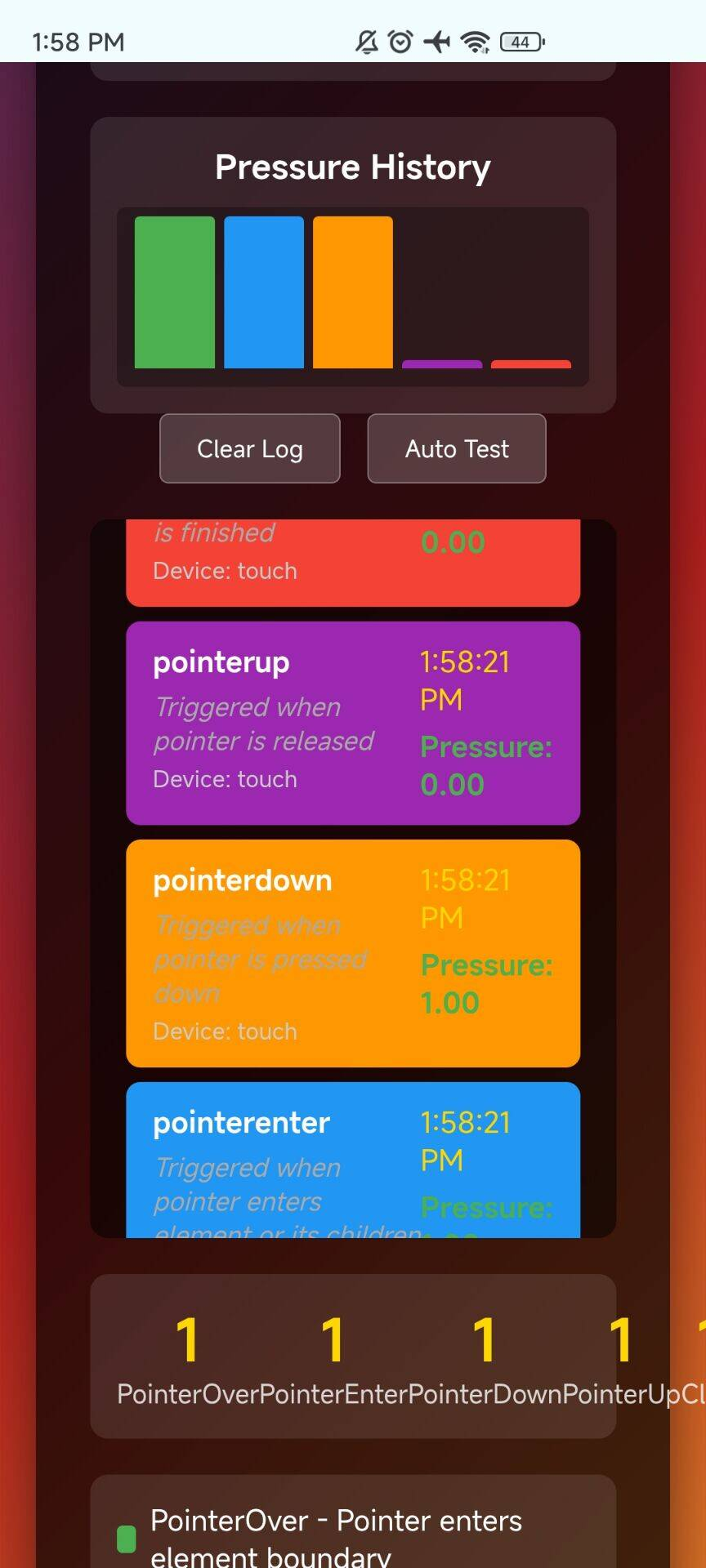
(real phone)
3. Why Fingerprint + Pointer Events Must Match Each Other
This is where almost every bot dies.
Anti-bot systems cross-check:
| Reported Fingerprint | Actual Input Behavior | Result |
|---|---|---|
| Browser shows “Android WebView” | Input is mouse-like | ❌ Bot |
| Browser shows “iPhone Safari” | No pressure support | ❌ Bot |
| Browser shows “Windows Chrome” | Pressure value > 0 | ❌ Impossible → Bot |
| Touchscreen claimed | No pointerenter / pointerover | ❌ Bot |
To pass modern detection, you need:
✔ Matching OS
✔ Matching browser engine
✔ Matching pointer capabilities
✔ Matching movement curves
✔ Matching pressure sensor behavior
This is exactly where TrafficBotPro becomes unique.
4. How TrafficBotPro Simulates Human Pointer Events (Not Just .click())
Instead of doing a DOM .click(), TrafficBotPro simulates:
✓ Full pointer event chain
(pointerover → pointerenter → pointerdown → pointerup → click)
✓ Device-consistent pressure curves
Based on:
Android touchscreen
iOS touch input
Windows precision trackpad
macOS touchpad
External mouse behavior
✓ Micro motion paths with jitter
Human motion is never a straight line.
TBP simulates:
acceleration
deceleration
sub-pixel curves
natural hand jitter
✓ Realistic timing delays
No bot fires events in perfect intervals (like 20ms → 20ms → 20ms).
TBP uses dynamic timing variations.
✓ Browser fingerprint sync
This is the killer feature.
TrafficBotPro’s pointer behavior matches the simulated OS fingerprint.
Example:
When using “Android Chrome Fingerprint”, the pointerdown event naturally includes pressure values from 0.1–0.45.
When using “Windows Chrome Fingerprint”, pressure becomes 0 (because Windows mouse = no pressure sensor).
This is why TBP can bypass checks that block ordinary bots.
5. Why Anti-Bot Systems Cannot Easily Detect TBP’s Pointer Simulation
Most anti-bot tools rely on these checks:
Does pointerdown include pressure when the device fingerprint says it should?
Does the movement path match human biomechanics?
Are timing intervals too perfect?
Is there a mismatch between pointer type and claimed device?
Does the click appear too programmatic?
TrafficBotPro passes because:
1. The pointer chain is complete and natural
No single .click() reveals the bot.
2. Pressure curves follow real devices
Android touchscreens → yes pressure
iOS → no pressure values
Windows mouse → no pressure
macOS trackpad → OS-specific behaviors
3. Movement paths look like real hand motion
No jump-clicking.
4. Fingerprint consistency is perfect
Input behavior + browser fingerprint + OS signature = aligned.
Anti-bot systems can’t find contradictions.
6. Why This Matters for Real Applications
✔ Ad clicking (Google Ads, embedded networks)
Fake clicks with DOM .click() = instant detection.
Human pointer simulation drastically reduces detection risk.
✔ Filling + submitting forms
Most UI frameworks rely on pointerdown → pointerup to open dropdowns, sliders, menus, date pickers.
✔ Multi-step interactions
Hover menus
Carousels
Floating buttons
Drag-to-scroll
Touch-specific controls
✔ Behavior analytics & heatmap tracking
Sites record:
hover time
pointer travel distance
angle changes
down/up timing
TBP ensures all of these look natural.
7. Why Standard Automation Tools Will Never Match This
Libraries like Selenium, Puppeteer, Playwright rely on:
simulated DOM events
synthetic clicks
scripted delays
non-human pointer paths
They are designed for testing, not for stealth.
They are not meant to simulate human biomechanics, OS hardware constraints, or pressure sensors.
TrafficBotPro is.
8. Final Thoughts
If your automation relies on simple JavaScript .click(), anti-bot systems will spot you instantly.
But if your automation tool can:
replicate complete pointer event sequences
generate hardware-accurate pressure curves
sync behavior with browser fingerprints
simulate actual human motion + timing
match touch, mouse, and OS behavior correctly
Then detection becomes extremely difficult.
TrafficBotPro is currently one of the only automation systems capable of producing real device-like interaction signals, even while running automated scripts.
This is what makes it stand out—and why it’s able to bypass modern interaction-based detections that defeat ordinary automation tools.