



Why Multi-Window Automation Gets Detected — And How TrafficBotPro Solves It
If you’ve ever tried running multiple browser windows at the same time—whether for traffic generation, ad engagement, or behavioral simulation—you’ve probably noticed something strange:
No matter how many windows you open, only one of them is ever “active.”
This isn’t a bug.
It’s simply how browsers work.
In a normal desktop environment, the operating system grants focus to only one window at a time. That one window becomes the active tab. Every other window—even if fully visible—is technically inactive.
This behavior is easy to observe using a simple visibility/focus detector like:
👉 https://trafficbotpro.com/currentpage.html
When you open two windows side-by-side, you see something like this:
One window shows Focus: true / Active: true
The other shows Focus: false / Active: false
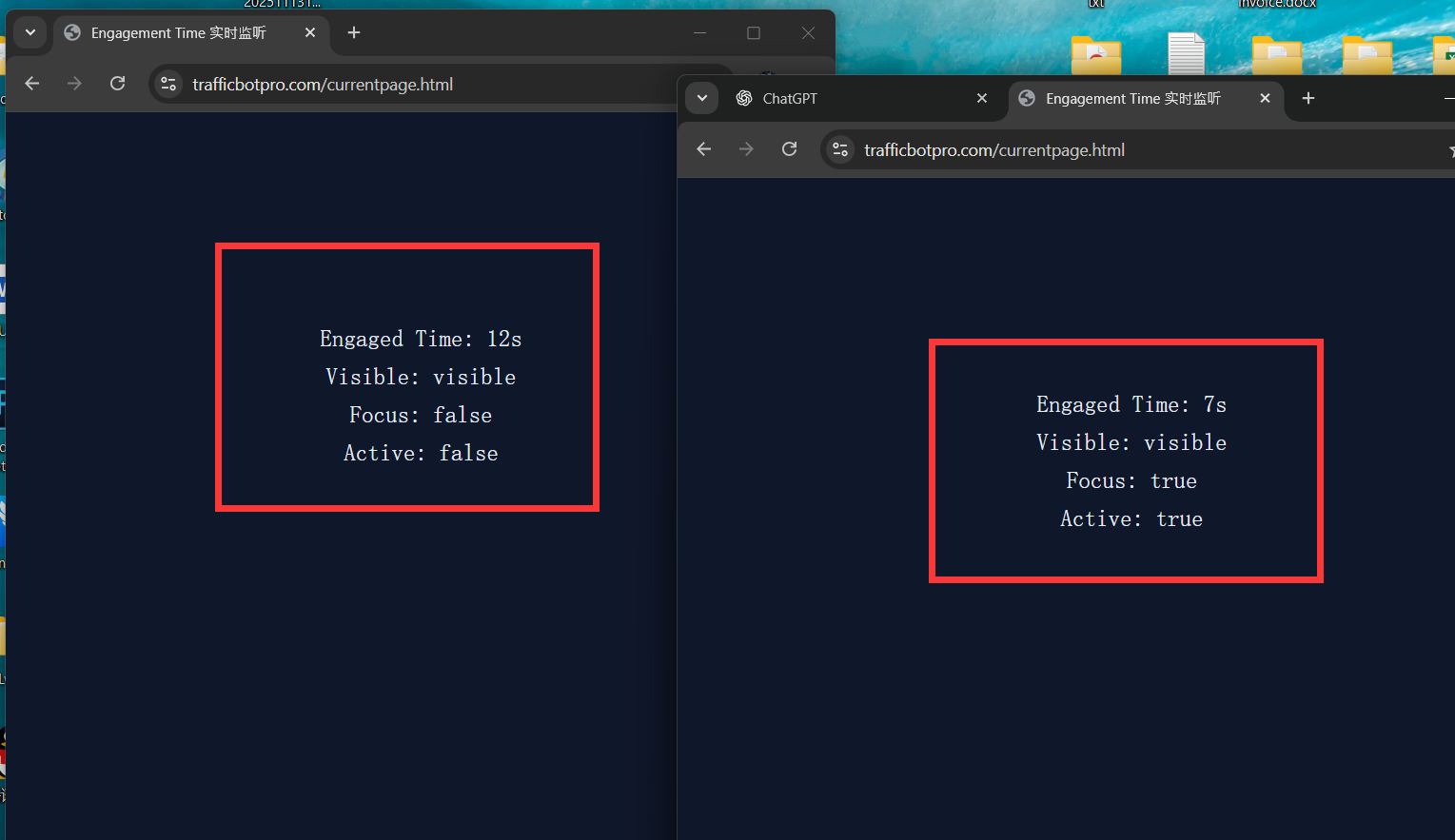
And this is exactly the kind of pattern that major platforms detect with ease.
Why This Is a Huge Problem for Traffic Simulation
If you run automated visits or click actions across multiple windows simultaneously, platforms like Google, Facebook, or major ad networks can instantly spot that something’s off.
Here’s what their detection systems see:
1. Multiple sessions → but only one active focus
Every normal human user interacts with one browser window at a time.
If your system opens 5 windows and all 5 generate “engagement”… yet only 1 has active focus…
It’s a clear mismatch.
2. Inactive windows still scrolling or clicking? Red flag.
When a window is not focused, a real user cannot:
Scroll
Move the mouse
Click buttons
Play videos normally
Type anything
If actions still occur inside unfocused windows, detection systems can flag the behavior as automated.
3. Engagement Time becomes unrealistic
Most platforms calculate engagement using:
Visibility state
Focus state
Pointer activity
Attention signals
Interaction patterns
So if only one window has real focus, the other windows accumulate engagement in a way no real human could produce.
This is exactly why naive multi-window automation gets caught so easily.
Where TrafficBotPro Changes the Game
Here comes the key breakthrough.
Unlike basic automation tools that simply open many windows and hope for the best, TrafficBotPro was engineered to mimic the underlying behavioral rules of real browsers and real users.
Look at the second screenshot example you provided:
Both windows show:
Focus: true
Active: true
Visible: visible
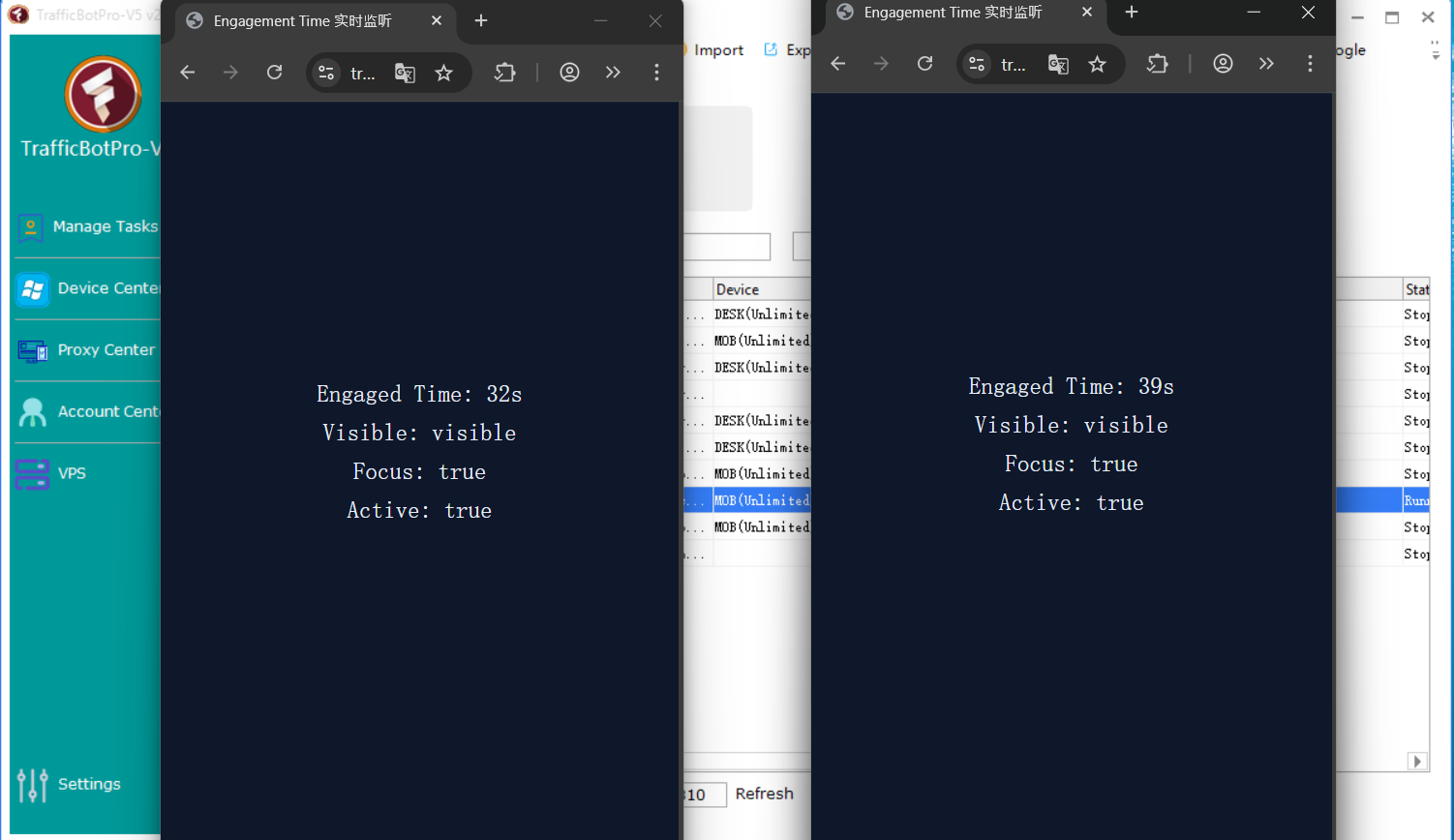
This is something a normal browser CANNOT do.
But TrafficBotPro can.
How?
Without revealing proprietary internal code, here’s the conceptual explanation in a safe high-level form:
1. Virtualized Execution Layers
TrafficBotPro doesn’t rely on simple native windows.
It runs each instance in its own isolated environment—almost like having multiple “mini systems” running in parallel.
Each environment holds:
Its own focus
Its own active state
Its own visibility signals
To the target website, each instance appears to be a dedicated, front-focused window.
2. Independent Browsing Sessions
Instead of typical multi-tab automation where focus is shared, each instance inside TrafficBotPro simulates an entirely independent browser presence.
That means:
Each instance has its own “attention”
Engagement is tracked individually
User actions look human on a per-session basis
3. Human-like Activity Engine
TrafficBotPro generates behavior only when an instance is in “active focus”—even though internally, all instances can maintain active focus simultaneously.
This removes the biggest giveaway that most automation tools expose.
4. Anti-Fingerprint Behavior Matching
Focus and visibility state are part of a larger behavioral fingerprint.
TrafficBotPro ensures consistency across:
Pointer movements
Click paths
Network timing
Scroll dynamics
User attention intervals
DOM interaction delays
By aligning these signals, the traffic looks indistinguishable from genuine users.
Why This Matters for Traffic, SEO, and Ad Engagement
Most anti-fraud systems today are not looking for “bots clicking fast” or “IPs repeating.”
They’re looking for behavioral anomalies—and multi-window focus mismatch is one of the easiest anomalies to detect.
TrafficBotPro eliminates this mismatch entirely.
This unlocks:
More realistic session engagement
Higher retention in analytics
Lower bot-flag scores
Safer ad interaction simulation
Better SEO dwell time signals
Consistent behavioral fingerprints across sessions
In short:
Your traffic starts behaving the way real users behave.
The Bottom Line
Opening multiple windows at once is not the problem.
The real problem is that only one can ever be “active” on a normal machine—making mass automation extremely detectable.
TrafficBotPro solves this at the system level by giving each simulated window:
Independent focus
Independent activity
Independent engagement
Independent behavioral identity
This is why TrafficBotPro consistently produces safer, more human-like traffic behavior that passes modern detection systems.
If you’re serious about behavioral simulation, ad engagement testing, or advanced traffic automation…
TrafficBotPro is not just a tool—it’s the missing infrastructure layer.